Posts

Showing posts with the label Cara instal / uninstal OS/dll

Penginstalan XAMPP lengkap dengan Gambar
Image
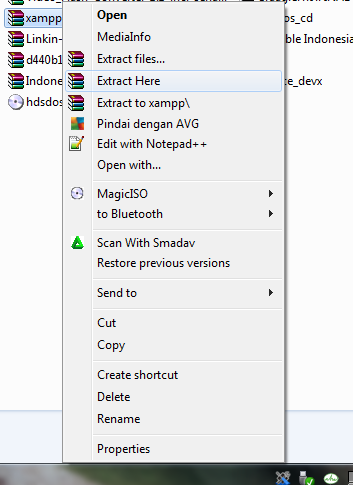
Pertama download dulu aplikasinya disini  =>>Download Xampp<<=  Setelah didownload lakukan penginstalan seperti berikut :  1. Buka tempat  File Xampp yg anda simpan yang sudah didownload  -> Klik Kanan Pada Xampp nya -> Sperti gambar dibawah -> Klik Extract Here. 2. Maka File yang anda extract akan terlihat sperti berikut ini : 3. Setelah and klik 2 x sperti gambar diatas maka tampilan instal xampp akan terlihat seperti dibawah ini : 4. Setelah Di klik next maka selanjutnya klik NEXT seperti berikut : 5. Kemudian akan muncul tampilan xampp service section langsung nextkan aja seperti gambr brkut : 6. Setelah itu jika berhasil klik tombol finish : 7. Selanjuntnya pilih yes : 8.Klik tombol start pada Apache & Mysql untuk membuat database: 9. Selesai deh untuk penginstalan XAMMPPNYA . 10. Belajar Membuat database dari CMD {command prompt}  =>> klik disini<<= Jika ada pertanyaan isika...

CARA MENGINSTAL WINDWOS VISTA LENGKAP

Image
A Windows Vista Ultimate Edition CD or DVD A Computer with CD-ROM or DVD-ROM access Bios set to boot of the CD/DVD-ROM drive. ( Check out this guide for help with the BIOS ) To start this Windows install insert the first CD or the DVD into the drive and start or restart your computer PART 1 Windows automatically run as the hard drive is blank, and will load files, this may take some time so be patient. Windows Vista install loding file Some of these stages can take quite sometime so be patient. Now select your install Language, LALU TEKAN NEXT SETINGAN DI BUAT DEFAULT AJA DI ATAS CUMAN CONTOH! TEKAN NEXT TEKAN NEXT TUK MELANJUTKAN MENGINSTAL KLIK KIRI DENGAN MOUSE 1X PADA INSTAL NOW PART 2 This section is the collecting information part. First you will need your Windows “Product Key”. This will be on the disk packaging provided with your CD’s/DVD’s. The product key will be 25 digi...